|
NM-422ETH
NMEA-0183 Multiplier With Ethernet Interface (User Guide) Introduction, Operation, Inputs, Outputs, Power supply, Connections, Connecting Ethernet interface, Led indicators, Configuring as Dual Converter, AutoPilot port, Specifications, troubleshooting, Installing Discovery utility, Using Discovery utility, DHCP Configuration, Manual Configuration, Virtual Port, UDP configuration, Downloads
|

Price 270.00 Euro
On-line orders -15% |
|
Led Indicator |
ON |
OFF |
|
Power |
Main power applied |
No power or wrong polarity |
|
Inb |
Currently sampling from input b |
|
|
Ina |
Currently sampling from input a |
|
|
TxD |
Transmitting data to all outputs |
|
|
RxD |
Receiving data from serial input or Ethernet channel. Also transmits these data to autopilot port |
|
|
Orange |
Network cable connected |
Check Ethernet connection and cable |
|
Green |
Data flow through TCP/IP |
No data flow through TCP/IP or no input |
|
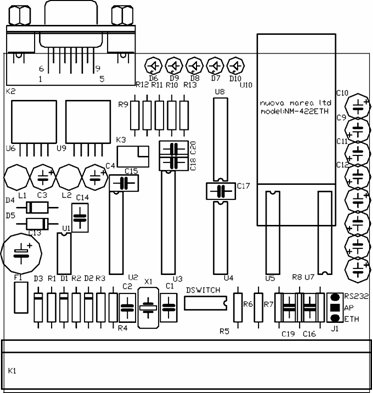
The NM-422ETH can be configured as a bidirectional RS-232 to TCP/IP converter and data distributor at the same time. This can be done by setting SW1 of dip switch array (see DSWITCH in figure 4), located inside the device, to position “ON” figure 4 Click image to enlarge |
|
Function |
SW-1 |
SW-2* |
SW-3* |
SW-4* |
|
Selects
transmission from active input to four general purpose ports,
RS-232 and Ethernet interfaces |
OFF |
X |
X |
X |
|
Selects transmission from Ina or Inb to four general purpose ports. Enables independent bidirectional data transmission between the RS-232 and Ethernet interface. |
ON |
X |
X |
X |
SW-2, SW-3 and SW-4 are intended for future use and should not be configured
|
Function |
Jumper |
|
Selects transmission to Auto Pilot port from RS-232 |
AP - RS232 |
|
Selects transmission fto Auto Pilot from Ethernet interface. |
AP - ETH |
